 AI RankingAI Adoption RankingsAI RankingAI Adoption Rankings
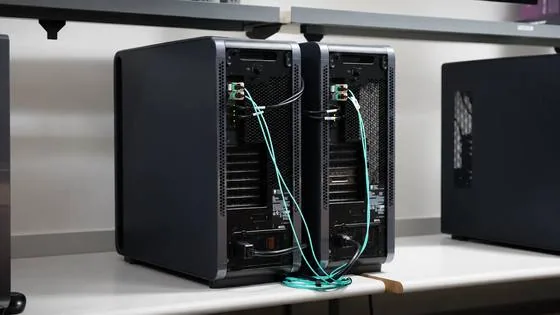
Running a frontier-scale model locally means keeping all its weights in GPU memory; the largest models no longer fit on one machine. Two NVIDIA DGX Stations connected over ConnectX-8 RDMA serve one model through a single endpoint, with tensor parallelism splitting the model weights and computation across both GPUs.
The NVIDIA GLM-5.3 NVFP4 model, a quantized version of Z.ai’s mixture-of-experts (MoE) model, has 753 billion parameters, with 40 billion activated per token. Sparse activation reduces computation, but all model weights still need to remain available because each token can be routed to different experts. At about 464 GB, the checkpoint exceeds the 252 GB of HBM3e on a single GB300 GPU. This tutorial uses two DGX Stations to keep the weights in GPU memory, with CPU weight offload disabled.
Before starting, connect the two Stations with the Connect Two DGX Stations playbook.
This post shows how to serve GLM-5.3 locally across two NVIDIA DGX Stations with vLLM, send a request, and measure behavior under concurrent load. Tensor parallelism (TP=2) splits the model’s tensors across the two GB300 GPUs. Both Stations compute every request, and Station A returns the answer through one OpenAI-compatible API. By the end, you’ll have a working endpoint and a baseline for how it behaves under load.
The companion video follows the same workflow.
This tutorial uses a separate computer, such as your laptop, to manage both Stations. Start by opening an SSH session to each Station from that computer. Alternatively, work from a local terminal on each Station. Run every command in this step on both Stations unless it starts with “On A.”
The two Stations run the same container and checkpoint in different roles: Station A (rank 0) hosts the API, and Station B (rank 1) runs only a worker, with no API server.
First, check Docker access and collect the network values you’ll use later:
The ibdev2netdev output lists the two direct rails, cx8r0 and cx8r1. Pick one for serving traffic, for example cx8r1, and note two things for it on each Station:
The rail name and device are the same on both Stations; only the IPv4 address differs.
Next, create ~/glm53.env on each Station. This file stores the values that later commands use:
Paste the following block and replace each <...> placeholder, keeping the quotes, with the values you noted.
For example, with the default addresses on cx8r1, Station A’s file starts like this. Station B’s file is identical except for RANK="1":
MODEL_HOST is built from your home directory, and Step 2 copies the checkpoint over SSH to the same path on Station B.
On both Stations, load the values and check storage, connectivity, and baseline memory:
These checks catch cabling and addressing mistakes before they surface as NCCL timeouts. Expect a 400000Mb/s link, MTU 9000, successful jumbo-frame pings, and synchronized time. nvidia-smi should show no compute processes on the GB300. On a Station with a display GPU, Xorg can appear on both GPUs with a few MiB.
Step 2 copies the checkpoint from A to B over SSH, so A needs passwordless access to B. On A, create a key without a passphrase (see SSH keys for details), copy its public key to B after checking B’s host fingerprint, and confirm the login:
Tensor parallelism requires both ranks to run the same software against the same weights. Start by pulling the pinned image on both Stations:
The pull can take several minutes. Matching arm64 digests mean both ranks run identical software.
On A, download the pinned checkpoint. At about 464 GB, it takes roughly an hour at 1 Gb/s, or about six minutes at 10 Gb/s:
When hf download prints Downloaded, copy the files to B. On A:
Each disk keeps the full checkpoint; vLLM partitions the weights across the GPUs at load time, with no further quantization.
On A, compare both copies (the check reads B’s file list over SSH), then validate the checkpoint:
MODEL_READY means both Stations hold the same file names and sizes in the expected layout. MIXED_PRECISION is expected: NVFP4 quantization targets MoE-block linear weights and activations, not every tensor.
This step turns two machines into one service: the same launch script runs on both Stations, reads ~/glm53.env, and starts one vLLM rank on each. Two settings matter most if you adapt it: --max-model-len 98304, the context ceiling in tokens, which covers input plus output, and --gpu-memory-utilization 0.93, which gives vLLM 93% of GPU memory. If you change other flags, change one at a time and test again.
For the latest recommended configurations, see NVIDIA’s Local AI recipe repository.
On both Stations, create a file named ~/launch-glm53.sh:
The script enables multi-token prediction (MTP), a form of speculative decoding: the model’s MTP layer drafts four tokens per step, and vLLM verifies them with the full model before accepting them, so each step can produce several tokens. The gain depends on how often drafts are accepted, which varies with the prompt.
FP8 KV-cache storage halves cache memory compared with 16-bit storage, leaving room for more tokens. Prefix caching is enabled to avoid reprocessing prompt prefixes the server has already seen. Paste the script below; it checks your configuration, finds the RoCE GID index for the selected rail, and starts this Station’s vLLM rank in a container:
Run the script on B first, then on A:
Each command prints a container ID and returns immediately; the service is not ready yet. B’s worker waits for A to join, then each Station loads its share of the weights from local storage, prepares kernels, and captures CUDA graphs. This takes several minutes.
On A, follow the log to see when the service is ready (--since hides output from earlier runs):
When the log shows Application startup complete, press Ctrl+C to stop following it; the service keeps running.
At this point one model spans two machines. Neither GPU holds a complete copy, and neither can answer a request alone: every token needs both ranks to exchange partial results over the RoCE rail.
The remaining GPU memory holds the KV cache, which stores the context of in-flight requests. The startup log reports its capacity (GPU KV cache size). All requests in flight share it, so longer prompts or more users need more of it. If you run out, lower --max-model-len or send fewer requests at once.
On A, check the API (127.0.0.1 is A itself):
HEALTH_OK proves that Station A answers. Next, on both Stations, check that the ranks communicate over GPU RDMA rather than falling back to TCP sockets. The check reads the NCCL logs that the launcher writes through NCCL_DEBUG=INFO, and the same block shows the loaded memory:
RDMA_CHECK_OK means the check passed with no warnings. In nvidia-smi, A shows the VLLM::Worker_TP0 process and B shows VLLM::Worker_TP1, one rank per GPU. The startup log reports about 218 GiB of weights per GPU, roughly half the checkpoint, which confirms that the model is split across the two GPUs.
On A, send a chat request through the OpenAI-compatible API:
The response should look like this:
finish_reason: stop means the model finished its answer instead of hitting the token limit. The request sets reasoning_effort to low in chat_template_kwargs. GLM-5.3 also accepts high and max, which let it reason longer before answering, at the cost of latency. Because the launcher enables tool calling (--enable-auto-tool-choice), agent frameworks that use the OpenAI tools API can call the same endpoint.
AIPerf, the NVIDIA benchmarking tool for inference endpoints, measures throughput and latency. Installing it inside the serving container can change vLLM’s dependencies, so on A, install it in its own virtual environment:
The install should end with No broken requirements found.
AIPerf can send synthetic prompts or replay an existing dataset. This tutorial uses the 80 Coding conversations from SPEED-Bench, a set of real prompts built to evaluate speculative decoding, so MTP is measured on realistic text. SPEED-Bench’s preparation script fetches these prompts from several Hugging Face datasets, including the gated cais/hle: if you haven’t already, open its page and select Agree and access repository before you continue. Then, on A, log in to Hugging Face:
Next, download and prepare the dataset. See the official AIPerf guide for details:
On A, check the dataset and service. Continue when the check prints BENCHMARK_READY:
The full sweep covers concurrency 1, 8, 16, and 32. At each level, AIPerf sends 3×C warmup requests, then measures 10×C requests, where C is the concurrency. Some conversations are sent more than once at higher concurrency.
Benchmark requests use the model’s default reasoning effort (max) and an 8,192-token output cap; responses can finish before reaching it. Full sweeps can take several hours.
A two-hour request timeout leaves room for long responses, --server-metrics collects server counters used to measure MTP acceptance, and --export-level raw keeps each response for inspection.
For a quick test, run the block below on A with both containers running and no other API traffic. It tests C1 and C8 with prefix caching enabled, as in the reference measurements in Table 2, below.
AIPerf saves metrics, raw responses, and logs in the results directory. Warmup requests are excluded from the reported metrics.
Optional: Reproduce Table 2. In ~/launch-glm53.sh from Step 3 on both Stations, keep --enable-prefix-caching and set --max-num-seqs to 16 or 32 for the corresponding group shown in the comments above. Before each group, stop and remove the current containers on A, then B (docker stop --timeout 60 "$CONTAINER", followed by docker rm "$CONTAINER"). Relaunch the updated script on B, then A with bash ~/launch-glm53.sh and wait for Application startup complete. On A, run the matching export CONCURRENCIES command from the comments, then rerun the AIPerf block.
To test without prefix caching, replace --enable-prefix-caching with --no-enable-prefix-caching in the Step 3 script on both Stations, then recreate the containers as above. Performance may differ from Table 2.
Figure 2 compares overall output throughput across measured requests with mean per-user throughput. Token counts include reasoning.
Table 2, below, shows how throughput and latency change as more requests share the service.
Overall throughput peaks at 607.8 tok/s at C16. It falls to 385.0 tok/s at C32, where mean request latency is 453.5 s. Higher concurrency also reduces mean per-user throughput, from 115.3 tok/s at C1 to 13.0 tok/s at C32.
After the requests finish, stop the vLLM container on A, then on B:
The status should read Status=exited Running=false, with no vLLM processes in nvidia-smi; the checkpoint, containers, and results stay on disk. To resume, run docker start "$CONTAINER" on B, then A, and repeat the Step 4 checks.
You now have a 753-billion-parameter model running behind one local API on two NVIDIA DGX Stations, with every weight in GPU memory. That opens up work that’s hard to do on a hosted endpoint: running inference on sensitive or proprietary data, prototyping agents locally, and iterating on prompts without per-token costs.
Connect your own application using the vLLM serving documentation, then rerun AIPerf with your prompts to find the concurrency that fits your workload. A frontier-scale model is now ready to build on, right from your desk.
Headline, image and article body come from Hacker News; all rights remain with it. Reproduced unmodified for indexing — please refer to the original.